SpeechPulse: Real-Time Speech-to-Text & Transcription Tool
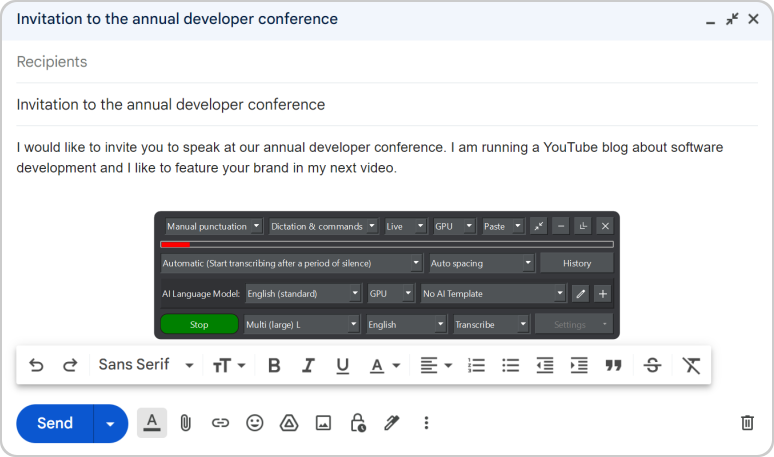
SpeechPulse turns your voice into text instantly across any app, while also transcribing files and generating subtitles in 99 languages.
Overview
SpeechPulse is a powerful speech recognition and translation tool designed to replace your keyboard with your voice. By tapping into your computer's microphone, it enables real-time dictation directly into text editors, browsers, and office software, making typing faster and more accessible for everyone. Beyond live dictation, it doubles as a robust transcription engine, converting audio and video files into accurate text and generating subtitles to boost content accessibility.
What sets SpeechPulse apart is its commitment to privacy and global usability. The software offers fully offline speech recognition, ensuring sensitive dictation and transcription never need to touch the cloud. With support for 99 languages and built-in English translation, it caters to a global user base, while AI-powered grammar and punctuation correction polishes your output automatically, saving valuable editing time.
Capabilities & Features
- Speech recognition
- Voice typing
- Dictation
- Transcription
- Subtitle generation
- AI
- Privacy
- Accessibility
- Productivity
- Translation
Core Features
- Real-time speech-to-text recognition
- Fully offline processing for enhanced privacy
- Audio and video file transcription
- Automatic subtitle generation
- Multi-language support across 99 languages with English translation
- AI-powered punctuation and grammar correction
Use Cases
- Dictating emails, reports, and documents into office applications and browsers
- Converting recorded interviews or lectures into written transcripts
- Creating subtitles for video content to improve accessibility and reach
- Replacing manual typing with voice input to increase productivity
- Cleaning up spoken text drafts with AI-driven grammar correction
Best For
- Executives
- Students
- Writers
- Journalists
- Researchers
- Transcriptionists
- Video editors
- Fast typists seeking voice-powered efficiency
Pros
- •Works offline, ensuring data privacy for sensitive dictation
- •Supports an extensive range of 99 languages
- •Functions across virtually any application, not just a dedicated editor
- •AI grammar correction reduces manual editing time
- •Versatile for both live dictation and file-based transcription/subtitles
Cons
- •One-time pricing model may feel steep upfront compared to subscription tools
- •Requires separate purchases for Windows and macOS unless buying the bundle
- •Accuracy may vary depending on microphone quality and background noise
- •No mention of mobile platform support
How to Use
Simply speak into your computer's microphone to dictate text directly into any active application, such as a word processor, email client, or web browser. For file-based work, upload your audio or video files into the software to generate accurate transcriptions or synchronized subtitles automatically.
Frequently Asked Questions
Open in AI Studio
Ask our AI to evaluate if SpeechPulse fits your specific workflow.
Connect & Contact
Pricing
SpeechPulse uses a one-time purchase model priced at $99 for either Windows or macOS individually, or $159 for a bundle covering both platforms.
Pricing data is provided as a summary. Visit the vendor website for full tier details.