MyRoomDesigner.ai: AI Interior Design & Room Renderer
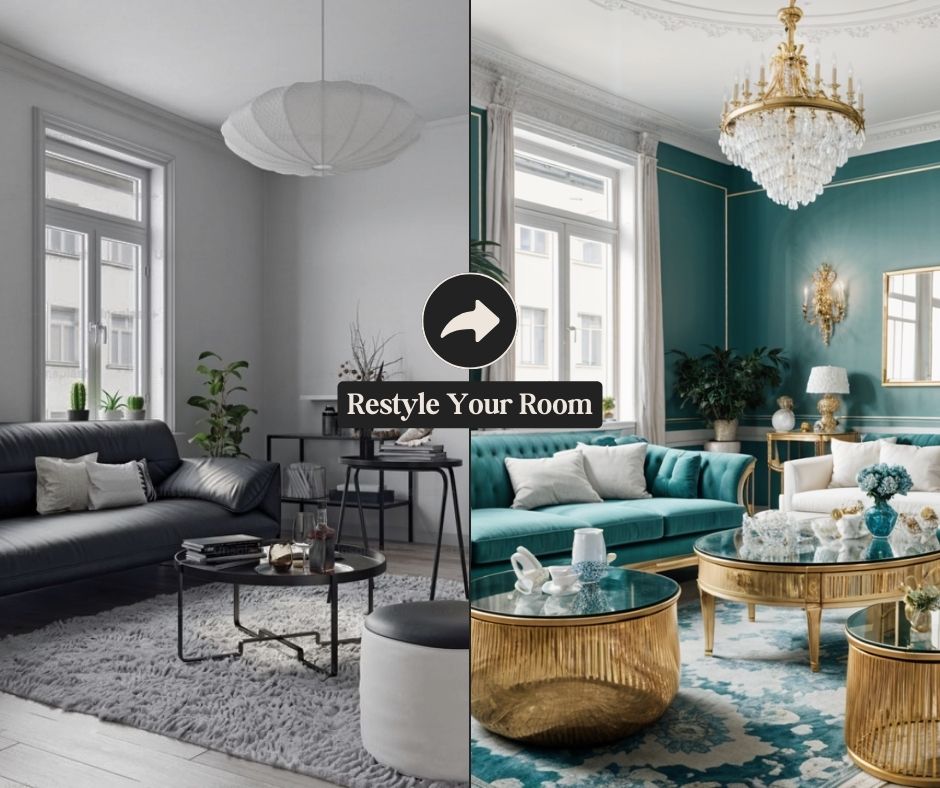
MyRoomDesigner.ai transforms photos of your space into stunning styled renders in seconds using AI. Instantly generate mood boards and shopping lists to bring your dream room to life.
Overview
MyRoomDesigner.ai is an AI-driven interior design platform that turns a simple room photo into a fully realized design concept in moments. Instead of hiring a designer or spending hours sketching layouts, users can upload an image of their space, pick a room type and style, and let the AI generate multiple design variations tailored to their taste. Whether you're drawn to contemporary minimalism, rustic warmth, or industrial edge, the tool adapts to a wide range of aesthetics and even mimics popular design influencer styles.
Beyond visualization, MyRoomDesigner.ai bridges the gap between inspiration and execution. It automatically builds mood boards, removes backgrounds from product images, and generates shopping lists so users can actually purchase the furniture and decor featured in their new design. An interactive chat feature lets you fine-tune results conversationally, requesting specific tweaks until the render matches your vision exactly.
This makes it a versatile tool for a broad audience—homeowners planning a renovation, interior designers seeking rapid client mockups, real estate agents staging listings virtually, and furniture retailers showcasing products in realistic settings. By combining AI-powered rendering with practical shopping tools, MyRoomDesigner.ai turns the often overwhelming process of redesigning a room into a fast, guided, and shoppable experience.
Capabilities & Features
- AI interior design
- Room design
- Mood board
- Interior design
- Home decor
- AI design
- Virtual staging
- Room planner
- Design tool
Core Features
- AI-powered room redesign from a single photo
- Wide range of style and theme applications
- Automated mood board creation
- One-click shopping list generation
- AI background removal for product images
- Product search and 'Find Similar Products' tool
Use Cases
- Redesigning a living room into a contemporary showcase
- Building a mood board for a bedroom renovation project
- Generating a shopping list to furnish a home office makeover
- Creating virtual staging renders for real estate listings
- Producing quick style mockups for interior design clients
Best For
- Homeowners
- Interior designers
- Real estate agents
- Furniture retailers
- Design enthusiasts
Pros
- •Generates multiple design styles from a single uploaded photo
- •Combines visualization with actionable shopping lists
- •Offers extra tools like background removal and product upscaling
- •Conversational AI chat allows detailed, iterative refinements
- •Free plan available for testing core functionality
Cons
- •No refunds due to GPU-intensive generation costs
- •AI Generations and boards are capped even on paid tiers
- •Higher usage tiers can get pricey for frequent professional use
- •Design quality may still require manual review for real-world feasibility
How to Use
1. Upload a photo of the room you want to redesign. 2. Select the room type (e.g., living room, bedroom, office). 3. Choose your preferred design style and color palette. 4. Specify any additional changes or preferences you want reflected in the design. 5. Let the AI generate multiple design variations based on your input. 6. Chat with the AI to request further refinements, then create a mood board and shopping list from the final design.
Frequently Asked Questions
Open in AI Studio
Ask our AI to evaluate if MyRoomDesigner.ai fits your specific workflow.
Pricing
MyRoomDesigner.ai offers a free tier with limited monthly generations, while paid plans range from $15 to $75 per month, scaling up boards, AI generations, and product import limits for heavier users.
Pricing data is provided as a summary. Visit the vendor website for full tier details.