MailBuddy: GPT-4 AI Email Reply Assistant for Gmail
MailBuddy is a free GPT-4 powered Chrome extension that helps you draft smart, context-aware email replies directly inside Gmail in seconds.
Overview
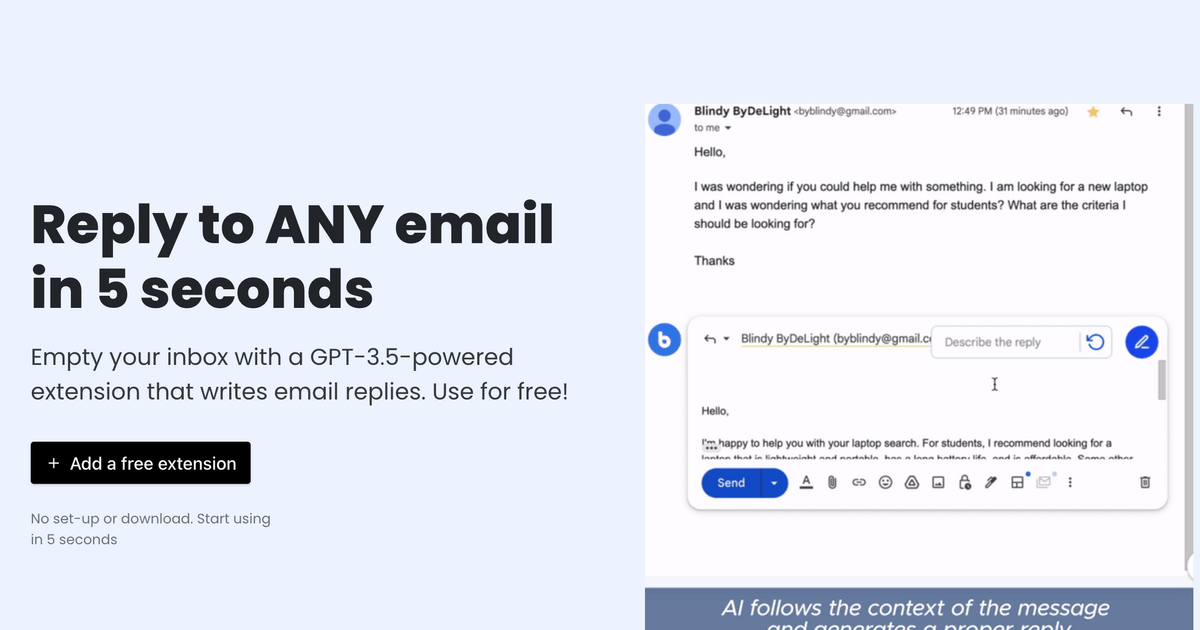
MailBuddy transforms your Gmail inbox into an AI-assisted reply machine. Powered by GPT-4, this lightweight Chrome extension reads the context of incoming emails and instantly generates thoughtful, relevant responses—cutting down the time you spend staring at a blank reply box. Whether you need a quick acknowledgment or a detailed follow-up, MailBuddy adapts to your needs without ever leaving your inbox.
What sets MailBuddy apart is its flexibility in tone and control. You can instruct the AI to write in a polite, formal, funny, or casual style, and even add specific details or questions you want included in the response. Before anything gets sent, you retain full editorial control, tweaking the AI-generated draft to match your voice perfectly. It's a seamless companion for anyone drowning in email traffic.
Designed specifically for busy professionals, entrepreneurs, marketers, and customer support teams, MailBuddy integrates directly into the native Gmail reply workflow. There's no need to copy-paste text into a separate app or juggle multiple tabs—everything happens within a simple panel that appears right where you need it.
Capabilities & Features
- AI email assistant
- GPT-4
- Email automation
- Productivity tool
- Gmail extension
- Chrome extension
- Email reply generator
Core Features
- GPT-4 powered contextual reply generation
- Adjustable response tones (polite, formal, funny, and more)
- Native integration inside the Gmail reply window
- Manual editing controls before sending
- Custom instruction input for tailored replies
- No character or usage limits
Use Cases
- Rapidly responding to customer inquiries and support tickets
- Clearing out a backlog of follow-up emails
- Drafting professional replies for corporate correspondence
- Crafting polite or formal responses for sensitive situations
- Injecting specific details, links, or questions into a generated reply
Best For
- Professionals
- Entrepreneurs
- Marketing teams
- Customer support teams
- Anyone managing a high volume of email
Pros
- •Completely free with no usage restrictions
- •Saves significant time on routine email replies
- •Multiple tone options for different communication needs
- •Works directly inside Gmail without switching tabs
- •Only accesses email text, limiting broader data collection
Cons
- •Currently only available as a Chrome extension
- •Only works for replies, not composing new emails
- •No mention of support for other email providers
- •Relies on GPT-4 context understanding, which can occasionally misread nuance
How to Use
1. Install the MailBuddy extension from the Chrome Web Store.
2. Open Gmail in your browser.
3. Open the email you'd like to respond to and click the 'Reply' button.
4. Locate the MailBuddy panel that appears in the reply box.
5. Click the generate icon to create an AI reply, or type specific instructions for the tone or content you want.
6. Review and edit the generated draft to ensure it matches your voice.
7. Hit send once you're happy with the response.
Frequently Asked Questions
Open in AI Studio
Ask our AI to evaluate if MailBuddy - ChatGPT AI Email Assistant fits your specific workflow.
Pricing
MailBuddy is completely free to use with no character or usage limits.
Pricing data is provided as a summary. Visit the vendor website for full tier details.