Magic Eraser: Free AI Object Removal Tool Online
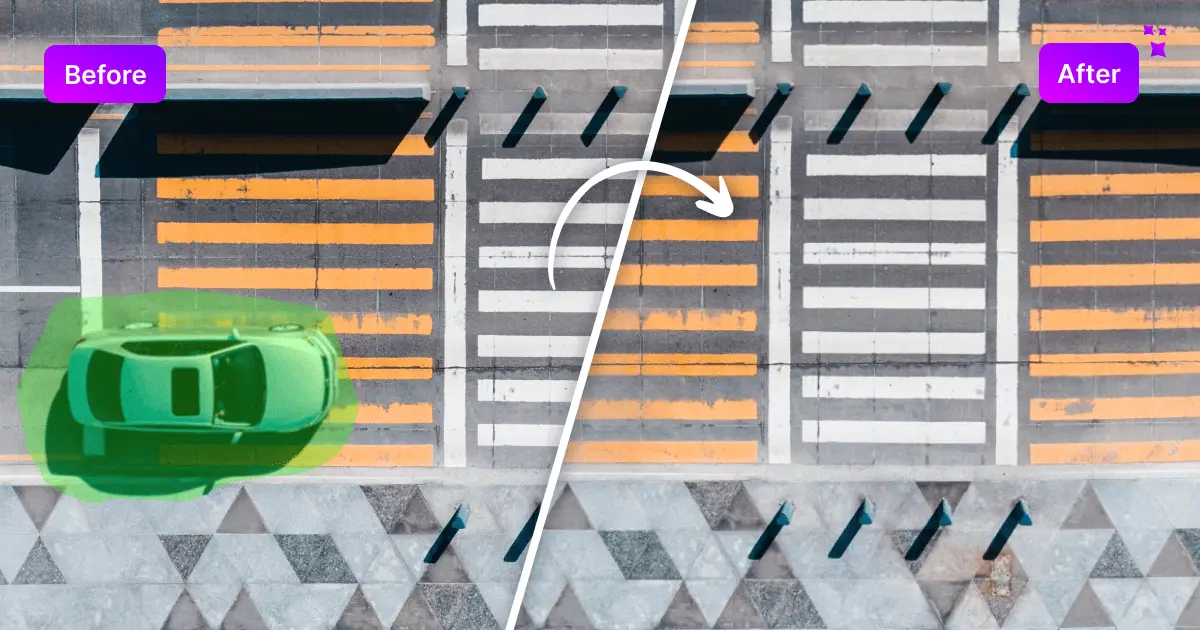
Magic Eraser is a free AI-powered tool that lets you erase unwanted objects, people, text, or blemishes from photos in seconds—no signup required.
Overview
Magic Eraser, developed by Magic Studio, is a browser-based AI editing tool designed to make photo retouching effortless. Simply upload an image, brush over the element you want gone—whether it's a stray photobomber, distracting background clutter, watermark, or skin blemish—and let the AI intelligently fill in the space with content that blends naturally into the surrounding scene. The entire process takes just seconds and requires no account creation or software installation.
What sets Magic Eraser apart is its accessibility: it's completely free to use with unlimited edits, making it a go-to solution for casual users and professionals alike who need quick touch-ups without the steep learning curve of tools like Photoshop. From cleaning up real estate listings to polishing e-commerce product shots and social media posts, Magic Eraser handles a wide range of everyday photo-editing needs with a simple brush-and-erase workflow.
While the free tier includes ads, a watermark, and capped resolution, upgrading to PRO unlocks high-resolution downloads, bulk editing for up to 50 images at once, and full access to Magic Studio's broader editing suite—making it scalable for both hobbyists and businesses handling large photo volumes.
Capabilities & Features
- AI image editing
- Object removal
- Photo editing
- Image retouching
- Background removal
- Blemish removal
- Text removal
Core Features
- AI-powered object and content removal
- Intuitive brush selection tool for precise edits
- Fast, seconds-long image processing
- Simple, beginner-friendly interface
- Bulk editing support for up to 50 images (PRO)
- Wide file format compatibility (JPG, PNG, HEIC, WEBP, TIFF)
Use Cases
- Removing unwanted objects from real estate photos to create more appealing listings
- Cleaning up e-commerce product photos by eliminating background distractions
- Erasing people or photobombers from travel and personal photos
- Removing text, logos, or blemishes from social media images
- Batch-processing large photo sets for marketing campaigns
Best For
- Photographers
- Graphic designers
- Real estate agents
- E-commerce businesses
- Social media managers
- Marketing professionals
Pros
- •Completely free with unlimited use and no signup required
- •AI removal produces natural, seamless results in seconds
- •Simple brush-based interface requires no editing experience
- •Supports popular file formats including JPG, PNG, HEIC, and TIFF
- •Bulk editing available for high-volume workflows on PRO plan
Cons
- •Free plan includes ads and a visible watermark on downloads
- •Free downloads are capped at a low 600-pixel resolution
- •Bulk editing and high-res exports require a paid PRO subscription
- •AI fill may struggle with highly complex backgrounds or textures
How to Use
1. Upload the image you want to edit into Magic Eraser. 2. Use the brush tool to paint over the object, person, text, or blemish you want removed. 3. Click the erase button and let the AI process the selection. 4. Preview the result and download your cleaned-up image.
Frequently Asked Questions
Open in AI Studio
Ask our AI to evaluate if Magic Eraser fits your specific workflow.
Pricing
Magic Eraser offers a fully free plan with unlimited edits (though watermarked and low-resolution), while the PRO plan at roughly CN¥19.99/month (billed annually at CN¥239.99) removes ads and watermarks, unlocks high-res downloads, and adds bulk editing.
Pricing data is provided as a summary. Visit the vendor website for full tier details.