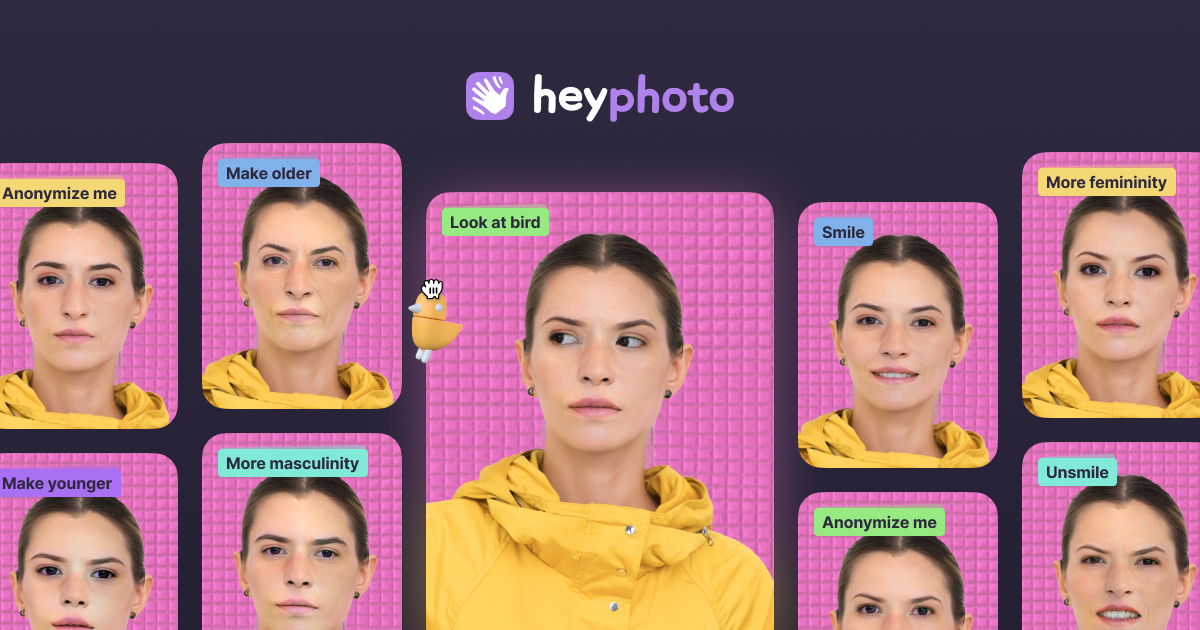
HeyPhoto: Free AI Face Editor for Photos Online
HeyPhoto is a free AI-powered photo editor that lets anyone fix and transform faces online in just a few clicks—no editing skills required.
Overview
HeyPhoto brings professional-grade face editing to everyone with its browser-based AI tool that automatically detects and adjusts facial features in any photo. Simply drop or paste an image, and the platform's intelligent sliders let you tweak gaze direction, age, gender, smile, hairstyle, skin tone, and more—all without downloading software or mastering complex editing techniques. Whether you're perfecting a selfie or touching up a group shot, HeyPhoto makes advanced facial manipulation accessible to casual users and photography enthusiasts alike.
Beyond simple enhancements, HeyPhoto offers creative and practical applications like adding makeup, modifying emotions, and even anonymizing faces for privacy-conscious users. The AI processes images up to 5MB with faces up to 1024x1024px, preserving the original quality and dimensions of your source photo. It's a versatile tool for anyone looking to experiment with different looks, improve portrait photography, or protect identities in shared images—all powered by smart automation that handles the technical heavy lifting.
Capabilities & Features
- AI photo editor
- Face editing
- Photo retouching
- AI face swap
- AI face generator
- Selfie editor
- Portrait editor
- Online photo editor
- Free photo editor
Core Features
- AI-powered automatic face detection
- Gaze direction and expression adjustment
- Age and gender transformation tools
- Smile and emotion modification
- Face anonymization for privacy protection
- Skin tone and hairstyle customization
Use Cases
- Polishing selfies and group photos before sharing on social media
- Anonymizing faces in images to protect privacy
- Experimenting with different hairstyles, ages, or genders for fun
- Enhancing portrait photography with subtle facial tweaks
- Adding makeup or adjusting emotions for creative projects
Best For
- Casual users
- Social media enthusiasts
- Hobbyist photographers
- Privacy-conscious individuals
- Anyone needing quick, no-skill face editing
Pros
- •Completely free to use with no hidden editing fees
- •No technical skills or software downloads required
- •Wide range of facial editing options in one tool
- •AI automates face detection for fast, easy editing
- •Useful privacy feature for anonymizing faces
Cons
- •Free version adds a watermark to all exported photos
- •Limited to images under 5MB and faces up to 1024x1024px
- •No advanced editing tools beyond facial features
- •Lack of transparency around paid tiers or premium options
How to Use
1. Visit the HeyPhoto website and drop or paste your photo into the upload area.
2. Wait for the AI to automatically detect faces in the image.
3. Select the editing tool you want to use (gaze direction, age, smile, gender, hairstyle, skin tone, etc.).
4. Use the provided sliders to adjust the selected feature to your liking.
5. Preview the changes in real-time as the AI applies them.
6. Download your edited photo once you're satisfied with the results.
Frequently Asked Questions
Connect & Contact
Pricing
HeyPhoto is completely free to use, though all edited photos include a watermark as part of the free service.
Pricing data is provided as a summary. Visit the vendor website for full tier details.