Git Assistant: AI-Powered Pull Requests with ChatGPT
Git Assistant links GitHub with ChatGPT to auto-generate pull requests from simple prompts, letting developers iterate on code changes in seconds.
Overview
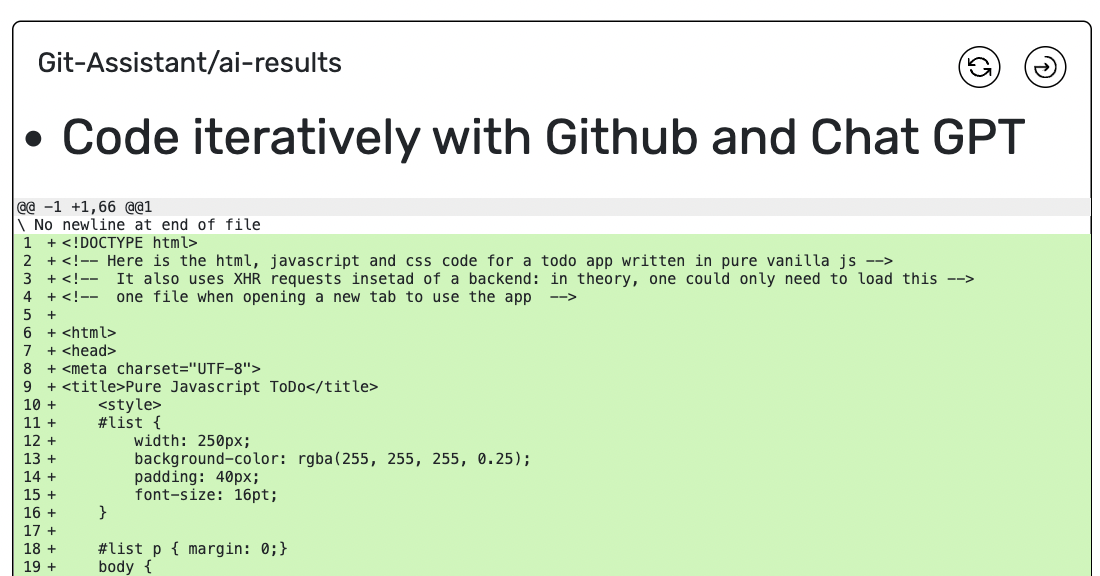
Git Assistant bridges the gap between conversational AI and version control by letting developers turn plain-English instructions into working pull requests. Simply supply a GitHub file URL, describe the change you want, and specify a line range—Git Assistant then taps ChatGPT to draft the modification and package it as a ready-to-review PR. This removes much of the manual copy-pasting and context-switching typically involved in using AI for coding tasks.
What sets Git Assistant apart is its iterative workflow: rather than starting from scratch each time, users can build on prior prompts to progressively refine code, compare the AI's suggested changes side-by-side, and choose between 'edit' or 'completion' modes depending on whether they need surgical fixes or appended logic. It's a lightweight way to experiment with AI-assisted development while staying inside familiar Git workflows.
Whether you're a solo developer looking to speed up small fixes, a student learning how AI and Git intersect, or a prompt engineer testing how ChatGPT handles code tasks, Git Assistant offers a low-friction entry point. Its premium tier adds private pull request support for teams or individuals who need to keep experimental changes out of public view.
Capabilities & Features
- Git
- Github
- Chat GPT
- Prompt engineering
- Code generation
- Pull request
- AI-assisted coding
- Iterative coding
Core Features
- Automatic pull request generation powered by ChatGPT
- Iterative prompting to refine code across multiple rounds
- Side-by-side comparison view of AI-suggested changes
- Dual 'edit' and 'completion' modes for different editing needs
- Support for both code and text output formats
- Private pull request option for premium users
Use Cases
- Automating repetitive or small code modifications with AI
- Learning practical prompt engineering for code generation
- Rapidly drafting pull requests without manual editing
- Testing different prompt phrasings to optimize AI output
- Teaching students how AI tools integrate with Git workflows
Best For
- Software developers
- Prompt engineers
- Git and GitHub users
- ChatGPT power users
- Students learning AI-assisted coding
Pros
- •Speeds up routine code edits by automating pull request creation
- •Supports iterative refinement instead of one-off prompt attempts
- •Comparison view makes it easy to review AI-suggested changes
- •Flexible modes accommodate both edits and code completions
- •Affordable premium tier for private PR needs
Cons
- •Limited to line-range based edits, which may not suit large refactors
- •Quality of output depends heavily on ChatGPT's interpretation of prompts
- •Free tier lacks private pull request support
- •May require manual verification for complex or multi-file changes
How to Use
1. Paste the GitHub file URL you want to modify. 2. Write a clear instruction describing the desired code change. 3. Specify the line number range the AI should focus on. 4. Choose 'edit' mode for targeted changes or 'completion' mode for appending new code. 5. Review the generated pull request and compare it against the original file. 6. Optionally, build on the previous prompt to further refine the output before merging.
Frequently Asked Questions
Open in AI Studio
Ask our AI to evaluate if Git Assistant fits your specific workflow.
Connect & Contact
Pricing
Git Assistant offers a free core experience, with a Premium plan at just $2/month unlocking private pull requests and grandfathered access to future premium features.
Pricing data is provided as a summary. Visit the vendor website for full tier details.